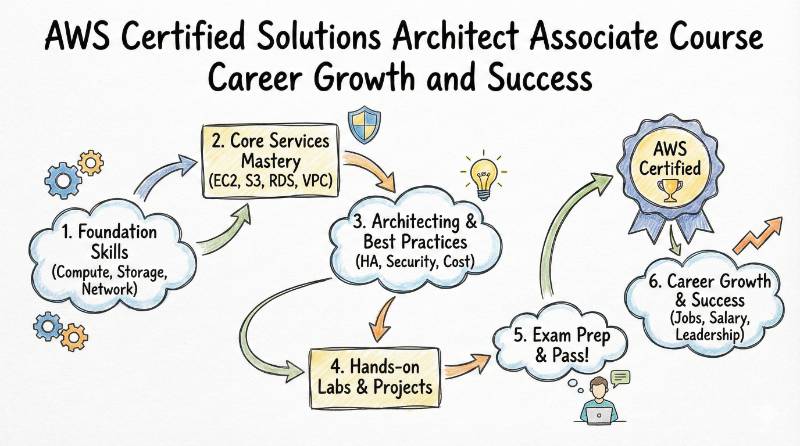
Introduction
In the two decades I have spent architecting systems—from the early days of on-premise rack-and-stack to today’s serverless ecosystems—one thing has remained constant: architecture is the backbone of technology. However, the tools have changed. Today, Amazon Web Services (AWS) is the dominant language of infrastructure. For working engineers, managers, and software developers, fluency in this language is no longer optional; it is a survival skill.The AWS Certified Solutions Architect – Associate is not just a badge. It is the gold standard. It proves you don’t just know the names of the services, but you understand how to weave them together to build secure, resilient, and cost-efficient systems.
At a Glance: The Certification Profile
Before we dive deep, here is the high-level view of what you are signing up for.
| Feature | Details |
|---|---|
| Certification Name | AWS Certified Solutions Architect – Associate |
| Track | Architecture |
| Level | Associate (Intermediate) |
| Who it’s for | Solutions Architects, DevOps Engineers, Developers, Systems Administrators |
| Prerequisites | None official. (Recommended: 1 year of hands-on experience) |
| Skills Covered | IAM, VPC, EC2, S3, RDS, Auto Scaling, Load Balancing, Serverless (Lambda), Security |
| Recommended Order | Take this as your first or second AWS certification (after Cloud Practitioner) |
Deep Dive: AWS Certified Solutions Architect – Associate
What is it?
The SAA certification validates your ability to design distributed systems on AWS. Unlike other exams that might ask “What does S3 stand for?”, this exam presents complex scenarios. It asks, “You have a legacy app that needs high availability but cannot handle session state replication. Which architecture fits best?” It tests your ability to make trade-offs between cost, performance, and security.
Who Should Take It?
- Software Engineers who want to stop throwing code “over the wall” and understand where their apps live.
- System Administrators transitioning from physical data centers to the cloud.
- Managers who need to vet technical proposals and understand AWS bills.
- Freshers looking for the single most employable credential in the cloud market.
Skills You Will Gain
- Network Architecture: Designing VPCs, subnets, NAT gateways, and VPN connections.
- Compute Mastery: Choosing the right instance types (EC2) vs. container services (ECS/EKS) vs. serverless (Lambda).
- Storage Strategy: Knowing when to use S3 (Object), EBS (Block), or EFS (File).
- Database Selection: Deciding between Relational (RDS/Aurora) and NoSQL (DynamoDB).
- Security Posture: Implementing IAM roles, policies, and encryption at rest/transit.
- Cost Optimization: Spotting waste and designing for “FinOps” from day one.
Real-World Projects You Should Be Able to Do
After passing this exam, you should be confident executing these projects:
- Multi-Tier Web Application: Deploying a highly available WordPress site with an Application Load Balancer, Auto Scaling Group, and Multi-AZ RDS.
- Serverless API Backend: Building a REST API using API Gateway, AWS Lambda, and DynamoDB that scales to zero when not in use.
- Secure VPC Design: Creating a 3-tier network (Public, Private App, Private Data) with strict Security Groups and NACLs.
Preparation Plans: Choose Your Timeline
Depending on your current experience, choose the plan that fits.
1. The “Refresher” Plan (7–14 Days)
Best for: Engineers who already work with AWS daily but need to fill knowledge gaps.
- Day 1-3: Focus entirely on VPC networking (CIDR, Routes, VPC Peering). This is where most seniors fail.
- Day 4-6: Deep dive into “new” services you don’t use (e.g., Kinesis, Redshift, Glue).
- Day 7-10: Practice exams. Focus on reading long scenario questions quickly.
- Day 11-14: Review whitepapers (Well-Architected Framework).
2. The “Standard” Plan (30 Days)
Best for: Working professionals with some IT background.
- Week 1: Core Services (IAM, EC2, S3). Do labs on S3 lifecycle policies and IAM roles.
- Week 2: Networking & Databases. Build a custom VPC from scratch.
- Week 3: High Availability & Decoupling. Learn SQS, SNS, and Auto Scaling.
- Week 4: Practice Exams + Reviewing “Why I failed this question.”
3. The “Foundational” Plan (60 Days)
Best for: Beginners or career switchers.
- Month 1: Watch a full video course. Do every single lab twice. Don’t rush. Understand why an IP address works the way it does.
- Month 2: Focus on the “Well-Architected Framework.” Read the 6 pillars. Take practice tests until you score consistently above 80%.
Common Mistakes to Avoid
Over my years of mentoring, I see smart people fail because:
- Ignoring the Whitepapers: The “AWS Well-Architected Framework” is the bible of this exam. Read it.
- Console-Only Knowledge: Clicking buttons is easy. Knowing why you clicked them is hard. The exam tests the “why.”
- Misunderstanding VPCs: If you cannot calculate a CIDR block or understand the difference between a Security Group (stateful) and NACL (stateless), you will struggle.
- Skipping the “Niche” Services: You will see questions on FSx, Storage Gateway, and Athena. Do not ignore them.
Choose Your Path: 6 Specialized Learning Paths
The Solutions Architect Associate is the gateway. Where you go next depends on your career goals.
1. The DevOps Path
- Focus: Automation, CI/CD, IaC.
- Next Cert: AWS Certified DevOps Engineer – Professional.
- Key Skills: CodePipeline, CloudFormation, Terraform.
2. The DevSecOps Path
- Focus: Hardening infrastructure, Compliance.
- Next Cert: AWS Certified Security – Specialty.
- Key Skills: GuardDuty, Inspector, KMS, WAF.
3. The SRE (Site Reliability Engineering) Path
- Focus: Observability, Reliability, Incident Response.
- Next Cert: AWS Certified SysOps Administrator – Associate.
- Key Skills: CloudWatch, X-Ray, Systems Manager.
4. The AIOps/MLOps Path
- Focus: Machine Learning pipelines, automated remediation.
- Next Cert: AWS Certified Machine Learning – Specialty.
- Key Skills: SageMaker, Kinesis, Glue.
5. The DataOps Path
- Focus: Big Data processing, Analytics.
- Next Cert: AWS Certified Data Analytics – Specialty.
- Key Skills: Redshift, EMR, Athena, Lake Formation.
6. The FinOps Path
- Focus: Cost visibility, budgeting, optimization.
- Next Cert: AWS Certified Solutions Architect – Professional (for deep organizational complexity).
- Key Skills: Cost Explorer, CUR, Savings Plans.
Role → Recommended Certifications Mapping
If you are currently in one of these roles, here is your specific roadmap.
| Current Role | Recommended Certification Stack |
|---|---|
| DevOps Engineer | SAA + DevOps Professional |
| SRE | SAA + SysOps Administrator + Networking Specialty |
| Platform Engineer | SAA + DevOps Professional + Kubernetes (CKA) |
| Cloud Engineer | SAA + SysOps Administrator |
| Security Engineer | SAA + Security Specialty |
| Data Engineer | SAA + Data Analytics Specialty |
| FinOps Practitioner | Cloud Practitioner + SAA |
| Engineering Manager | Cloud Practitioner + SAA (for technical credibility) |
Top Training Institutions
To clear this exam, you need structured learning. Here are the top institutions that provide training and certification support.
DevOpsSchool
The premier destination for cloud training. They don’t just teach you to pass the exam; they teach you to survive the job interview. Their curriculum is heavily hands-on, covering the real-world scenarios that the SAA exam loves to test.
Cotocus
Excellent for corporate training and consulting-led learning. Their instructors are often working consultants who bring live project examples into the classroom, making the abstract concepts of AWS concrete.
Scmgalaxy
With deep roots in the configuration management and DevOps community, Scmgalaxy offers training that connects AWS architecture with the broader software supply chain ecosystem. Great for those coming from a legacy background.
BestDevOps
A focused provider that specializes in intense, boot-camp style training. If you need to get certified quickly and efficiently with a no-nonsense approach, this is a strong contender.
devsecopsschool
If your goal is eventually security, starting your SAA journey here ensures you learn architecture with a “security-first” mindset from day one.
sreschool
Tailored for the reliability engineers. They teach SAA concepts through the lens of uptime, latency, and error budgets, making it perfect for Ops professionals.
aiopsschool
Focuses on the intersection of AI and Infrastructure. They cover SAA with an emphasis on how these architectures support future AI workloads.
dataopsschool
Ideal for data engineers. They highlight the storage and database sections of the SAA curriculum more deeply than generic providers.
finopsschool
They approach the SAA curriculum with a strict focus on cost optimization, teaching you how to architect systems that don’t break the bank.
Frequently Asked Questions (General Career)
1. Is the AWS Solutions Architect Associate exam difficult?
Yes. It is scenario-based. You cannot memorize your way through it. You need to understand how services interact.
2. How long does the certification last?
It is valid for 3 years. You must recertify to keep your status active.
3. Do I need to know how to code?
Not strictly. You need to be able to read JSON (for IAM policies) and perhaps some basic scripts, but you do not need to be a Java or Python developer.
4. What is the passing score?
You need 720 out of 1000. It is a scaled score, so different questions have different weights.
5. How much time does it take to prepare?
For a working professional, 40-60 hours of dedicated study is the average.
6. Does this certification increase my salary?
Statistically, yes. It is consistently ranked among the highest-paying IT certifications globally.
7. Can I take the exam from home?
Yes, AWS offers online proctoring via Pearson VUE.
8. What happens if I fail?
You must wait 14 days before you can retake the exam. There is no limit on attempts, but you pay every time.
9. Is the “Cloud Practitioner” required first?
No. It is optional. If you are technical, you can skip straight to SAA.
10. What is the difference between Associate and Professional?
Associate is about single accounts and standard architectures. Professional covers multi-account strategies, complex migrations, and hybrid architectures.
11. Is hands-on experience mandatory?
AWS recommends 1 year of experience, but it is not a hard requirement to register for the exam.
12. Which cloud provider should I start with?
AWS is the market leader. Learning AWS first makes learning Azure or Google Cloud much easier later.
FAQs (Specific to AWS Solutions Architect – Associate)
1. What is the exact exam code?
The current version is SAA-C03. Always ensure your study materials match this version.
2. How many questions are on the exam?
There are 65 questions. 50 are scored, and 15 are unscored “pre-test” questions (but you won’t know which is which).
3. How much does the exam cost?
Currently, it costs $150 USD.
4. What are the main domains covered?
Design Secure Architectures (30%), Design Resilient Architectures (26%), Design High-Performing Architectures (24%), and Design Cost-Optimized Architectures (20%).
5. Are there labs in the SAA exam?
No. As of now, the SAA exam consists of Multiple Choice and Multiple Response questions. There are no hands-on labs during the test.
6. Can I use a calculator during the exam?
No. The math required (usually for CIDR blocks or basic cost estimation) is simple enough to do mentally.
7. What is the best resource for practice questions?
Stick to reputable providers like DevOpsSchool or official AWS practice sets. Avoid “exam dumps” as they often contain wrong answers and violate ethics policies.
8. Does this cert cover Linux administration?
No. It covers AWS services. You won’t be asked Linux kernel questions, but knowing Linux helps you understand EC2.
Next Certifications: What’s After SAA?
Once you have the SAA, you have three distinct directions:
- Same Track (The Vertical Step):
AWS Certified Solutions Architect – Professional. This is a massive leap in difficulty. Do not attempt this immediately; get real experience first. - Cross-Track (The Horizontal Step):
AWS Certified Developer – Associate or AWS Certified SysOps Administrator – Associate. These deepen your skills in implementation and operations. - Leadership/Specialty:
AWS Certified Security – Specialty. If you want to move into a high-demand niche, security is the best bet.
Testimonials
“I spent 5 years in support and felt stuck. The training at DevOpsSchool for the SAA exam changed my perspective. I didn’t just pass the exam; I learned how to design systems. I’m now a Cloud Engineer.” — Rahul S., Bangalore
“The scenario-based training was the key. The actual exam felt just like the practice sessions. Highly recommend the SAA path for any manager who wants to be taken seriously.” — Sarah J., Austin
“I thought I knew AWS because I used EC2. This course showed me how much I didn’t know. The section on VPC peering and Transit Gateways was an eye-opener.” — Vikram M., Pune
Conclusion
In this industry, technologies evolve faster than we can document them. I have seen countless trends—from virtualization to containerization—come and go. But the need for sound, resilient architecture never changes. The AWS Certified Solutions Architect – Associate is not just a certification; it is a fundamental baseline for the modern IT professional. It forces you to stop thinking in terms of “servers” and start thinking in terms of “services.” It shifts your perspective from “fixing what broke” to “designing what won’t break.” Whether you are a developer looking to own your infrastructure, or an operator looking to automate your existence, this certification is the bridge to that next level. It differentiates the “cloud-aware” from the “cloud-native.”