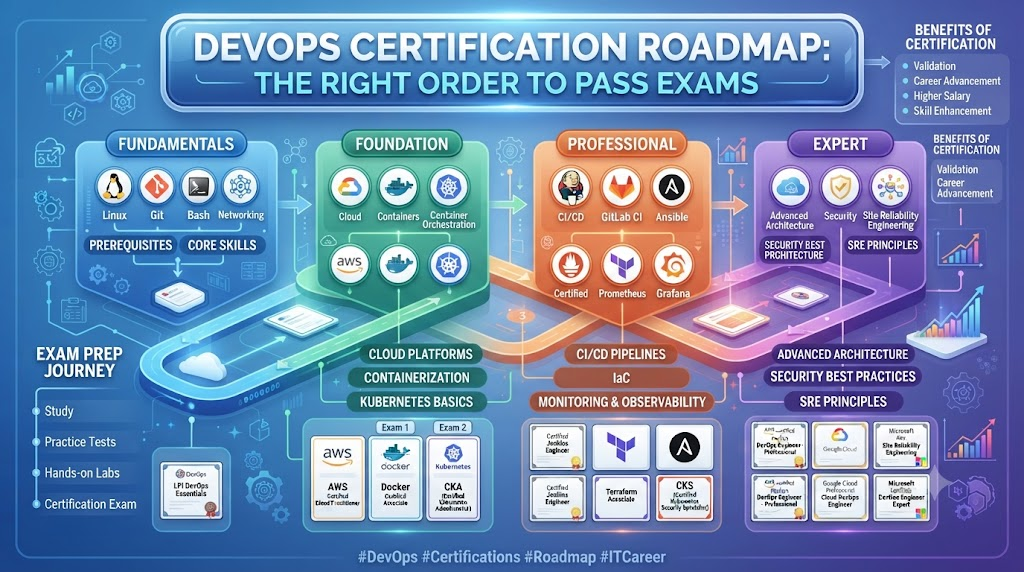
Starting a career in cloud and automation feels confusing at first. Too many tools appear every day. Online videos pull you in different directions. You waste weeks on random lessons. You need one clear path that shows what comes next. A steady guide stops the confusion. It helps you learn the right skills in the right order. DevOpsSchool.org works as a free open community space for this exact need. It gives simple plans so you can move forward with confidence.
What is DevOpsSchool.org
DevOpsSchool.org is a free open platform made for learners. It supports students, career switchers, and working engineers. The site offers free 90-day study guides. Each guide breaks learning into weekly steps. An open tool directory lists the software people use daily. An exam registry shows useful tests. Career pages give resume tips and interview help. All content stays free. The community keeps it updated. You can follow the paths at your own pace without pressure.
Starting with a Step-by-Step Learning Plan
An ordered plan saves many months of lost effort. People who jump between tools often forget the basics. They feel stuck later. A clear DevOps roadmap shows the correct sequence. You begin with Linux. Then you learn version control. After that you add automation. This order creates a strong foundation. A practical DevOps learning path also sets small weekly targets. You practice one skill. You build a tiny project. You review your notes. This steady rhythm works better than scattered videos. Learners who follow such a path finish faster and remember more.
Skills Needed to Become a Full Engineer
Daily skills form the heart of the work. First master Linux. Learn commands that manage files and processes. Next learn Git for version control. It tracks every change in your code. Then practice simple scripting with Bash or Python. Scripts handle repeated tasks without effort. These three areas start a solid DevOps engineer roadmap. Add basic networking next. Understand how machines talk to each other. Use free cloud accounts for practice. Create small labs each week. Hands-on work turns theory into real ability. Keep a simple notebook of every command you try. Review it often.
Choosing the Right Software for Daily Work
Engineers rely on special software every day. These programs handle hard jobs automatically. Containers pack applications so they run the same on any machine. Pipelines test code and move it forward without manual steps. Monitoring tools watch systems and send quick alerts. These form the core DevOps tools. You do not need all of them at once. Choose one tool from each group. Practice with a small real project. Repeat until the steps feel natural. Later you can add more. Always pick tools that solve actual problems first.
Evaluating Technology Options Side by Side
Several platforms often do the same job. Container tools come in different styles. Code pipelines also offer many choices. Monitoring options vary in features and price. A careful DevOps tools comparison helps you choose wisely. Look at how easy each one feels. Check free usage limits. See how active the community stays. Test each option with a short project. Write notes about speed and clarity. Select the tool that matches your current level. You can switch later if needed. Good comparison removes guesswork.
Table 1: Core Engineering Areas and Beginner Projects
| Skill Area | Key Focus | Beginner Project | Why It Matters |
|---|---|---|---|
| Linux Basics | File and process control | Set up a simple web server | Daily work starts here |
| Version Control | Track code changes | Create a Git repo for a script | Teams share work safely |
| Scripting | Automate repeated tasks | Write a backup script | Saves hours every week |
| Containers | Pack apps the same way | Run a small app in a container | Apps move easily across systems |
| Pipelines | Test and ship code | Build a basic auto-test flow | Code reaches users faster |
| Monitoring | Watch system health | Set alerts for high CPU use | Problems get fixed early |
Exploring System Reliability and Uptime
Big web applications must stay available. Users leave when sites stop working. Site reliability specialists focus on this challenge. They create rules that keep systems healthy. They run practice failure drills. They measure how long services stay online. An SRE roadmap begins with simple monitoring. Next comes the idea of error budgets. Then comes automatic recovery steps. You learn to balance new features with system stability. Practice by watching a small application and fixing issues yourself. This skill helps teams trust their systems more.
Understanding Internal Developer Platforms
Platform engineers create tools for other developers. These tools let teams start and ship applications faster. Developers request servers or databases with simple clicks. The platform handles the complex work behind the scenes. A clear Platform Engineering roadmap starts with self-service ideas. Then you learn to build simple portals. Next you add security checks and cost controls. You test everything with real feedback from developers. This work cuts waiting time. Teams deliver more value every week.
Validating Skills with Industry Exams
Employers want clear proof of your knowledge. Official tests provide that proof. Passing shows you understand real cloud ideas. Many tests cover Linux, cloud platforms, and automation. DevOps certifications make your resume stronger. They also give structure to your study. You review topics in a focused way. Choose exams that match your current stage. Practice with free sample questions. Take the test only when you feel ready. A certificate is useful. Real projects still matter more.
Planning Your Exam Journey in Order
Never begin with the hardest exam. Start with foundational tests. These cover basic cloud ideas and tools. After you pass, move to practitioner level exams. These ask you to solve real problems. A smart DevOps certification roadmap follows this sequence. It prevents overwhelm. Study one exam at a time. Build a small project that matches the topics. Review weak areas carefully. Then schedule the next test. This ordered plan builds both knowledge and confidence.
Table 2: Comparing Career Paths and Exam Priorities
| Target Role | Best Starting Track | Helpful First Exam | Top Goal |
|---|---|---|---|
| Cloud Automation Engineer | Linux and scripting | Foundational cloud exam | Automate daily server tasks |
| Site Reliability Focus | Monitoring and recovery | Reliability basics test | Keep apps online longer |
| Platform Builder | Self-service tools | Platform design exam | Help teams ship faster |
| Full DevOps Engineer | End-to-end pipelines | Practitioner automation exam | Own the full delivery process |
Finding Employment and Landing Interviews
Build a public GitHub profile first. Place your practice projects there. Write clear notes that explain what each project does. Share simple code that solves real problems. Update the profile every few weeks. Then search for open roles that match your skills. Look for entry-level DevOps jobs. Read the requirements with care. Adjust your resume to highlight matching projects. Practice explaining your work in plain words. Send short polite messages to hiring managers. Focus on what you built and what you learned. Steady effort opens doors over time.
Real-Life Scenarios and Learner Journeys
- A system administrator spent evenings learning Linux scripts and containers. After six months of practice projects he moved into cloud automation roles.
- A college graduate followed a weekly plan. She built small pipelines and shared them on GitHub. Recruiters noticed the clear portfolio and offered interviews.
- A software developer wanted faster releases. He studied deployment tools step by step. Within a year he led the team pipeline work.
- A career switcher from a non-tech field started with free labs. She tracked progress in a notebook. Steady practice helped her land a junior reliability role.
Common Mistakes to Avoid When Learning Cloud Skills
- Memorizing commands without using them in real labs.
- Collecting certificates but never building projects.
- Trying to learn every tool at the same time.
- Skipping basic Linux skills and jumping to advanced topics.
- Watching videos only and never typing the commands.
- Ignoring version control until late in the journey.
- Building projects that no one else can understand.
- Waiting for the perfect course instead of starting small.
- Forgetting to review old notes and practice.
- Comparing your speed to others instead of your own progress.
How DevOpsSchool.org Can Help
DevOpsSchool.org shares open roadmaps that anyone can follow. Community members add tips and updates regularly. Free career directories list useful links and guides. You study at your own pace. The platform welcomes both beginners and experienced learners. It keeps the focus on practical steps and real practice. Many people use it to stay on track and avoid common traps.
A Simple 7-Step Career Launch Plan
Follow these clear steps in order.
Goal – Decide the role you want in six to twelve months.
Search – Look for free guides and open tools that match that role.
Shortlist – Pick three or four learning paths that feel realistic.
Compare – Check time needed, practice projects, and community support.
Ask – Talk with others who already follow similar paths.
Verify – Test one small project from the chosen path.
Decide – Commit to the path and start the first weekly plan.
Frequently Asked Questions
Question 1: How long does it take to learn the basics?
Most people need three to six months of steady practice. Study one or two hours each day. Focus on Linux, Git, and simple scripts first. Build small projects every week. Progress depends on how often you practice. Consistency matters more than long study days.
Question 2: Do I need a computer science degree?
No. Many successful engineers started without one. Employers look at skills and projects. A clear GitHub profile often weighs more than a degree. Focus on building real labs and explaining your work. Practice interviews also help a lot.
Question 3: Which tool should I learn first?
Start with Linux commands and Git. These form the base for almost every other tool. After that choose one container tool and one pipeline tool. Learn them with small hands-on projects. Add more tools only when the first ones feel easy.
Question 4: Are free resources enough to get a job?
Yes. Many people land roles using only free guides and labs. The key is practice and visible projects. Share your work publicly. Write simple explanations. Free platforms like DevOpsSchool.org give structured paths that keep you on track.
Question 5: How do I know if I am ready for interviews?
You are ready when you can explain three or four projects clearly. Practice answering common questions out loud. Show that you can set up a basic pipeline or monitor a small app. Confidence grows with real practice, not with more certificates.
Question 6: Should I take certifications early?
Take a foundational exam after you finish basic projects. Early certificates without practice add little value. Use the exam topics as a study checklist. Build matching labs first. Then take the test. This order makes the certificate meaningful.
Question 7: What if I feel overwhelmed by all the tools?
Pause and return to your roadmap. Choose only one new skill at a time. Ignore shiny new tools until the current one is solid. Write a short weekly goal. Celebrate small wins. Overwhelm fades when the path stays narrow and clear.
Question 8: How important is Linux for DevOps roles?
Linux is essential. Most servers and tools run on it. Daily work involves files, processes, and permissions. Spend real time practicing commands. Build simple servers and scripts. Strong Linux skills make every other topic easier.
Question 9: Can I switch from a non-tech background?
Yes. Many people do it successfully. Start with free Linux and Git labs. Follow a structured weekly plan. Build a public portfolio. Stay consistent for six to twelve months. Community support and clear roadmaps help the transition.
Question 10: How do I keep learning after getting a job?
Continue small personal projects. Join community discussions. Review new tools only when they solve a real problem at work. Keep a learning notebook. Share what you learn with teammates. Steady curiosity keeps skills fresh.
Question 11: What makes a good beginner project?
A good project solves one clear problem. It uses tools you just learned. It has simple notes that others can follow. Examples include a backup script, a basic container app, or a monitoring alert. Keep projects small and complete.
Question 12: Where can I find free structured guidance?
Open community platforms offer free 90-day guides and tool lists. Look for clear weekly steps and practice ideas. DevOpsSchool.org provides such open roadmaps and career support. Use them to stay focused and avoid random study.
Conclusion
Stay consistent with daily practice. Build real labs instead of only watching videos. Follow a structured schedule so you always know the next step. Keep learning with the community and share your progress. A clear plan turns confusion into steady growth. DevOpsSchool.org remains a free open place where many learners find roadmaps and support. Start small today. Review your goals each week. Your career path becomes clearer with every project you finish.