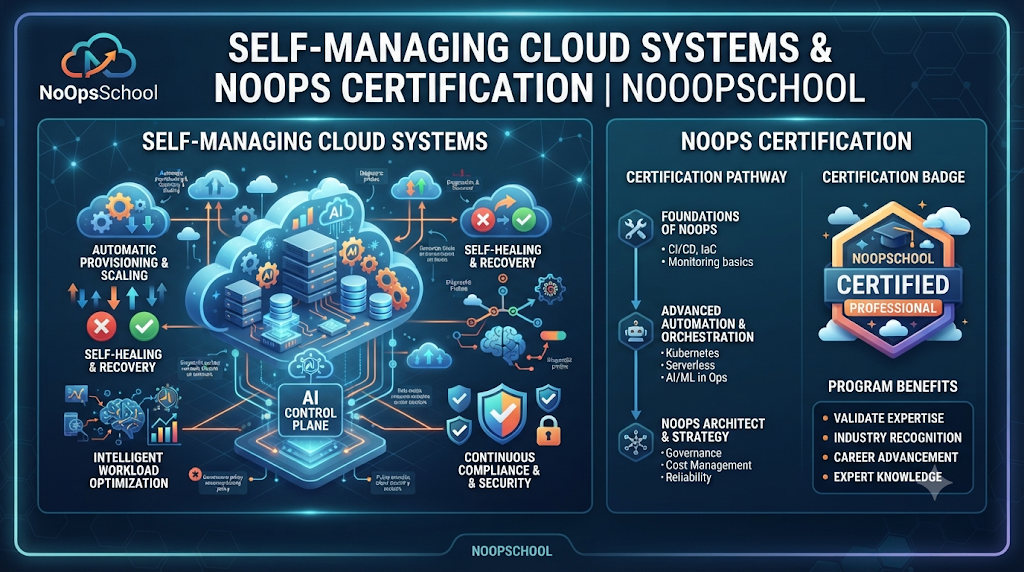
Think about the last time you finished writing a clean feature on a Tuesday afternoon, only to spend the rest of the week waiting for someone else to provision a database, open a staging port, or approve a routine deployment ticket. For most software developers, the slowest part of building software is not writing code—it is everything that happens between git push and live production traffic. Understanding what is NoOps through a developer’s daily workflow shows how modern teams remove those handoff delays without sacrificing safety.
At NoOpsSchool, we teach engineers, architects, and technical managers how to turn repetitive infrastructure chores into reliable, self-service workflows. Instead of pretending that servers magically maintain themselves, this guide explores how automation-driven operations work in real life, how NoOps builds on DevOps, which tools keep systems healthy, and how professionals build future-ready automation skills.
What Happens When Operations Become Self-Service
In plain terms, NoOps (“No Operations”) is an operational approach where routine infrastructure provisioning, deployments, scaling, and basic recovery run through automated platforms rather than manual tickets.
Why does that matter to everyday engineers? Because manual handoffs break flow. When developers can spin up compliant environments, deploy tested containers, and inspect live telemetry directly through Git workflows, ideas reach users in hours instead of weeks.
At the same time, NoOps never eliminates human accountability. Experienced engineers and architects still design network topologies, write security policies, manage cloud budgets, and investigate unusual production bugs. Automation simply takes over the predictable, repetitive clicks so humans can focus on solving real engineering problems.
Four Everyday Bottlenecks That Push Teams Toward NoOps
- Waiting Days for Test Environments: Developers sit idle while manual tickets bounce across infrastructure queues.
- Works-on-My-Machine Surprises: Hand-configured servers drift away from local setups, triggering preventable release-day bugs.
- Fragile Friday Deployments: Manual release checklists make shipping stressful, so teams batch risky changes into huge monthly updates.
- Noisy, Unhelpful Alerts: Engineers wake up at 2:00 AM to restart hung containers that an orchestrator could have healed automatically in ten seconds.
NoOps vs DevOps: How Developer and Operations Roles Evolve
People often frame NoOps vs DevOps as a rivalry, yet one naturally grows out of the other. DevOps broke down silos by encouraging developers and operations engineers to collaborate on shared pipelines and observability. NoOps takes that collaboration a step further by packaging infrastructure rules into self-service platforms so developers rarely need manual operational intervention to ship safely.
| Everyday Workflow | Manual IT Operations | DevOps Collaboration | NoOps-Oriented Workflow |
| Spinning Up Infrastructure | Filing tickets and waiting for manual server setup | Running shared Infrastructure as Code scripts | Opening a pull request that provisions approved cloud resources automatically |
| Shipping Code Changes | Manual handoffs during scheduled release windows | Automated CI/CD builds with manual gate approvals | Policy-checked CI/CD, GitOps reconciliation, and automated progressive rollouts |
| Handling Routine Faults | Paging an engineer to SSH in and restart services | Using shared dashboards and documented runbooks | Automated health checks, auto-scaling, and self-healing pod replacement |
| Where Engineers Focus | Repetitive patching and ticket fulfillment | Maintaining pipelines and improving team handoffs | Designing platform guardrails, security policies, and resilient architecture |
Inside the Toolchain: Core NoOps Automation Tools
Behind every smooth self-service developer experience sits a coordinated stack of NoOps automation tools handling provisioning, packaging, delivery, and visibility:
- Declarative Infrastructure (Terraform and OpenTofu): Define cloud networks, storage, permissions, and managed databases as readable code in Git so environments stay identical and auditable.
- Containers and Orchestration (Docker and Kubernetes): Bundle code and dependencies into portable containers while Kubernetes handles scheduling, load balancing, scaling, and automatic container restarts.
- CI/CD and GitOps (GitHub Actions, GitLab CI/CD, Argo CD): Run automated tests and security scans on every commit, while GitOps controllers continuously keep live clusters matched to Git configuration files.
- Observability and AIOps (Prometheus, Grafana, OpenTelemetry): Gather metrics, structured logs, and traces across microservices, using intelligent correlation to filter noise and highlight real user impact.
- Managed Cloud and Serverless Platforms (AWS, Microsoft Azure, Google Cloud): Offload operating system patching and server fleet maintenance to managed databases, queues, and serverless runtimes whenever workload fit allows.
Practical Code Example: Automated Deployment With Safe Rollout Guardrails
To see how declarative configuration protects developers during everyday releases, look at a Kubernetes Deployment configured with rolling update limits and a clean readiness endpoint:
YAML
apiVersion: apps/v1
kind: Deployment
metadata:
  name: user-profile-service
  namespace: production
spec:
  replicas: 4
  strategy:
    type: RollingUpdate
    rollingUpdate:
      maxUnavailable: 0
      maxSurge: 1
  selector:
    matchLabels:
      app: user-profile-service
  template:
    metadata:
      labels:
        app: user-profile-service
    spec:
      containers:
        - name: profile-api
          image: ghcr.io/example/user-profile-service:2.4.1
          ports:
            - containerPort: 8080
          resources:
            requests:
              cpu: "200m"
              memory: "256Mi"
            limits:
              cpu: "500m"
              memory: "512Mi"
          readinessProbe:
            httpGet:
              path: /health/ready
              port: 8080
            initialDelaySeconds: 5
            periodSeconds: 10
Setting maxUnavailable: 0 with a working readinessProbe ensures Kubernetes brings up healthy new pods before terminating old ones—so a developer’s routine merge never drops live user requests.
Seven Practical Steps to Automate Without Breaking Things
Trying to automate an entire engineering organization overnight usually creates fragile scripts nobody understands. A steady, step-by-step rollout builds confidence at every stage:
- Spot the Worst Friction First: Ask developers and ops engineers which manual tasks waste the most hours every week.
- Put Everything in Version Control: Store infrastructure definitions, deployment manifests, and policy rules in Git before automating execution.
- Create Golden IaC Templates: Build reusable Terraform or OpenTofu modules with built-in security tags, encryption, and least-privilege defaults.
- Automate Quality and Security Checks in CI: Run unit tests, dependency scans, and container checks automatically on every pull request.
- Turn On Unified Observability Early: Wire up metrics, logs, and traces before automating deployments so engineers can verify behavior immediately.
- Enable Guardrailed Self-Healing: Configure horizontal autoscaling, health probes, and automated rollbacks while keeping human review for high-risk database or network changes.
- Measure Real Outcomes: Track deployment frequency, lead time, and incident recovery speed monthly to see what actually improved.
Real-World Scenarios From Everyday Software Teams
- Pull-Request Preview Environments: Whenever a developer opens a pull request, CI triggers OpenTofu and Argo CD to spin up a temporary, isolated test environment, runs end-to-end checks, and destroys the stack once the code merges—eliminating shared staging bottlenecks.
- Hands-Free Recovery From Traffic Surges: A mobile app mention drives triple normal traffic over lunch. Kubernetes autoscalers add extra API pods within seconds and scale them back down afterward without waking an on-call engineer.
- Catching Misconfigurations Before Merge: Automated policy checks inside GitHub Actions flag an unencrypted cloud storage bucket in a pull request and block merge until fixed, preventing security drift before deployment.
Benefits, Trade-Offs, and Common Traps
Automation gives teams faster feedback loops, consistent environments, fewer manual typos, and calmer workweeks—but realistic teams plan around its trade-offs:
- Upfront Engineering Time: Writing clean templates, automated tests, and clear documentation takes effort before speed gains compound.
- Rapid Spread of Bad Configs: Automated pipelines deploy mistakes just as fast as fixes if canary rollouts and peer reviews are skipped.
- Ongoing Platform Care: Cloud APIs, Kubernetes versions, and security standards evolve continuously, meaning automation code needs regular maintenance.
Common Mistakes to Avoid
- Automating Broken Habits: Wrapping scripts around a confusing workflow only creates faster chaos; simplify the workflow first.
- Skipping Rollback Testing: An automated deployment pipeline without a tested one-click rollback is a trap waiting to spring.
- Assuming Automation Removes Ownership: Tools execute rules, but engineers, architects, and managers remain responsible for uptime, security, and budgets.
Building Automation Skills, Credentials, and Team Support
Thriving in automated cloud environments calls for hands-on fluency in Linux, cloud networking, Infrastructure as Code, Docker, Kubernetes, CI/CD, GitOps, observability, and security—paired with clear role ownership:
- Engineers focus on building reusable IaC modules, maintaining CI/CD and GitOps workflows, operating container platforms, and wiring telemetry.
- Architects focus on cloud topology, scalability patterns, security boundaries, and long-term automation strategy.
- Managers focus on governance, risk management, cost accountability, and enabling teams to adopt automation smoothly.
For professionals and organizations developing these capabilities, NoOpsSchool offers structured learning, credentials, and advisory options:
- Training and Credentials: Learners can enroll in a NoOps training course and pursue role-specific credentials—including NoOps certification, NoOps engineer certification, NoOps architect training, and NoOps manager certification—to organize practical skills around real operational responsibilities. (Training and certifications strengthen structured technical knowledge, while career progression grows through hands-on application.)
- Consulting and Specialized Talent: Teams modernizing legacy infrastructure can work with NoOps consulting services for operational assessments and automation planning, or hire NoOps freelancers when they need targeted, short-term support with Terraform, Kubernetes, or automated monitoring under internal security review.
Frequently Asked Questions (FAQs)
1. What is NoOps from a software developer’s point of view?
NoOps means developers can provision compliant environments, deploy tested code, and view live telemetry through automated, self-service workflows—without filing manual tickets for routine infrastructure tasks.
2. How does NoOps vs DevOps differ in day-to-day work?
DevOps focuses on collaboration and shared ownership between developers and operations engineers, while NoOps builds on those habits by turning repeatable operational tasks into automated, self-service platforms.
3. Does NoOps eliminate infrastructure or operations engineers?
No. Organizations still rely on skilled engineers and architects to design cloud platforms, manage security and compliance, optimize cloud spending, and troubleshoot complex production incidents.
4. Which NoOps automation tools should developers and ops teams learn first?
Start with Git for version control, Terraform or OpenTofu for Infrastructure as Code, Docker and Kubernetes for containers, GitHub Actions or Argo CD for automated delivery, and Prometheus with OpenTelemetry for observability.
5. What value do a NoOps training course and NoOps certification offer?
They provide a structured path to learn cloud infrastructure automation, IaC, containers, delivery pipelines, and governance—helping professionals build practical, role-aligned skills.
6. How do engineer, architect, and manager focus areas differ?
Engineers focus on hands-on pipelines, IaC, and cluster workflows; architects focus on system design, reliability, and security guardrails; and managers focus on governance, risk, and team enablement.
7. When should an organization use NoOps consulting services?
Consulting is useful when teams are planning cloud modernization, assessing operational bottlenecks, designing standardized CI/CD and security guardrails, or building a phased automation roadmap.
8. What precautions matter most when companies hire NoOps freelancers?
Define clear deliverables, grant temporary least-privilege access, store all code and documentation inside internal Git repositories, and enforce peer code reviews before production changes.
9. Can smaller development teams benefit from NoOps practices?
Yes—small teams gain huge leverage by combining managed cloud services, simple IaC templates, and automated CI/CD pipelines so they spend time building product features rather than managing servers.
10. How do teams keep automated deployments safe in production?
Use progressive rollouts (such as rolling updates with readiness probes or canary releases), automated security and policy checks in CI, real-time observability alerts, and tested rollback paths.
Conclusion
Great automation turns infrastructure from a daily roadblock into a quiet, dependable foundation. By combining Infrastructure as Code, container orchestration, GitOps delivery, and strong observability with clear human governance, teams ship better software faster without burning out.
Visit NoOpsSchool to explore role-focused training courses, certification tracks, consulting services, and automation resources designed to support your next step in modern cloud operations.