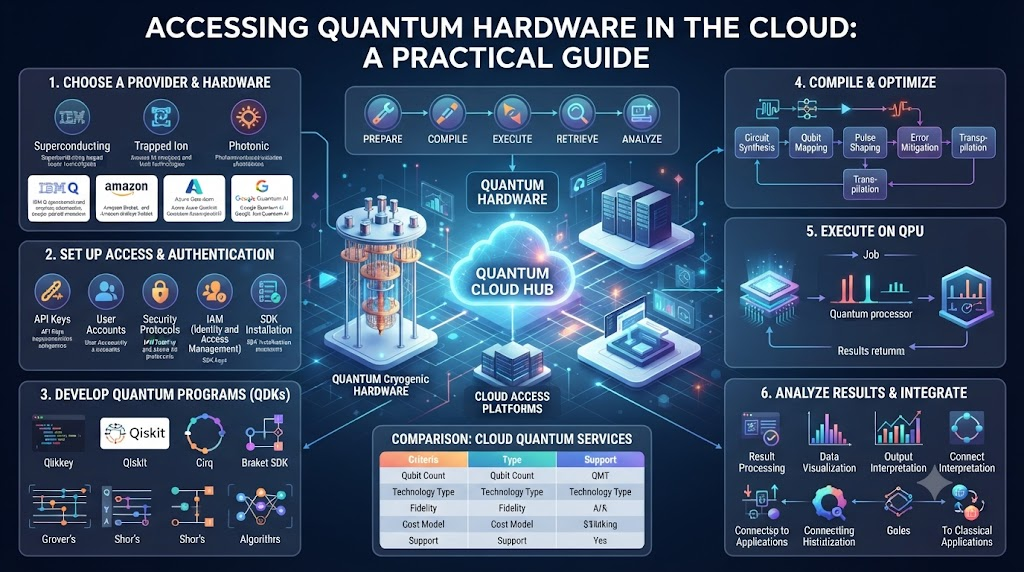
You want to run real code on a quantum computer. But you do not own a multi-million-dollar dilution refrigerator or a room-sized physics lab. You do not need one. Cloud computing brings these rare machines straight to your web browser.
Traditional computers use bits that hold a zero or a one. Quantum computers use qubits that can hold both states at once. This lets them solve complex math problems in seconds. Yet, building and keeping these fragile processors cold is tough. That is why cloud platforms lead the way.
You can learn how to bridge this gap today. To start your journey with expert guidance, visit QuantumOpsSchool.com to explore hands-on cloud quantum labs.
Cloud access lets teams test ideas without buying hardware. You write code on your laptop, send it over the internet, and get results back. This setup opens doors for developers, students, and researchers alike. You just need an internet connection and basic programming skills to begin.
What Is Cloud Quantum Access?
Cloud quantum access means using web tools to run jobs on real quantum chips. These chips sit in secure data centers. They stay very cold to protect the delicate qubits from heat.
When you send a job, the cloud system queues it up. It translates your code into pulses of microwaves or lasers. These pulses control the physical qubits. Once the run finishes, the system sends the raw data back to your screen.
You do not need a degree in nuclear physics to use these tools. Software libraries handle the heavy math. They let you build circuits using simple Python commands. You focus on the logic while the cloud platform handles the hardware.
Why Developers Choose the Cloud
Running quantum code on local machines is nearly impossible for large problems. Simulators take up too much memory. Once you go past thirty qubits, normal computers run out of RAM.
Cloud hardware solves this memory crunch. Real quantum processors handle the heavy lifting for you. You only pay for the time you use. This saves your company money and cuts down on setup time.
Another big perk is speed. Cloud providers update their systems often. You get access to newer processors with more qubits as soon as they launch. You never have to worry about broken wires or faulty cooling systems.
Understanding Qubits and Gates
Classical computers use logic gates like AND and OR. Quantum computers use quantum gates. These gates change the state of your qubits in unique ways.
You string these gates together to make a quantum circuit. Think of it like a musical score. Each note changes the final sound. In the same way, each gate changes the final probability of your data.
Working in the cloud helps you test these circuits fast. You can run a small test circuit a thousand times in a few seconds. This lets you spot errors and fix your code before running expensive jobs.
Comparing Classical and Quantum Workloads
| Feature | Classical Computing | Quantum Computing |
| Basic Unit | Bit (0 or 1) | Qubit (Superposition of 0 and 1) |
| Primary Use | General tasks, web browsing, data storage | Optimization, cryptography, molecular modeling |
| Environment | Normal room temperature | Near absolute zero (-273 degrees Celsius) |
| Error Rates | Very low | High (requires error correction) |
Setting Up Your First Cloud Environment
Before you write code, you need the right tools. Most cloud providers use Python. You will need to install a few open-source packages on your laptop.
Start by setting up a virtual environment. This keeps your project clean. Next, install your chosen quantum software development kit. Popular tools include Qiskit, PennyLane, and Cirq.
Once your tools are ready, make an account with your cloud provider. They will give you an API token. Paste this token into your local code. This key links your laptop to the remote quantum hardware.
Writing Your First Quantum Circuit
Let us look at a simple task. You want to put a qubit into a superposition state. This means it has an equal chance of being a zero or a one.
You start by importing your software libraries. Then you create a circuit with one qubit and one classical bit. You add a Hadamard gate to that qubit. This gate creates the superposition.
Finally, you measure the qubit. The measurement forces it to pick a final state. You send this job to the cloud. A few moments later, you see the results. You might get zero fifty percent of the time and one the other fifty percent.
Managing Queue Times and Budgets
Cloud quantum hardware is a rare resource. Many users want to run jobs at the same time. This creates long queues during peak hours.
You must learn to manage your time. Submit your test jobs to a simulator first. Simulators run on normal computers and give instant results. Save the real cloud hardware for your final runs.
Keep an eye on your token balance or cloud credits. Large circuits take longer to run and cost more. Optimize your code to use fewer gates. This saves time and keeps your budget intact.
Real-World Story About Server Crashes / Case Studies
- A financial firm tried to run a large portfolio optimization job on local simulators and crashed their entire office server cluster due to memory overflow.
- Engineers at an energy company moved their grid balancing algorithms to a cloud quantum platform and cut their processing time down from hours to minutes.
- A university research team lost three days of work when a local cryogenic cooling pump failed during a delicate physics experiment.
- Moving to a managed cloud quantum service let a biotech startup test drug molecule interactions without buying expensive lab equipment.
- A logistics company tested route planning on a sixteen-qubit cloud processor and found better delivery paths than their old classical software.
- An aerospace team faced severe software bugs when mixing old classical code with new cloud quantum libraries.
- A student group ran out of free cloud credits mid-semester because they did not check the cost of running deep circuits.
- A security firm used cloud quantum random number generators to test encryption keys against advanced hacking threats.
- An automotive manufacturer simulated battery chemistry problems on remote quantum chips to find lighter materials for electric cars.
- A solo developer built a mobile app feature that sends optimization tasks to a cloud quantum backend without owning any physical hardware.
Overcoming Hardware Noise and Errors
Real quantum hardware is noisy. Stray magnetic fields, heat, and imperfect gates cause errors in your data. Your results will not always match clean math models.
You need to use error mitigation techniques. These are software tricks that spot noise and clean up your data. They run extra tests to measure how bad the noise is on a given day.
Always run your circuits multiple times. This is called taking shots. If you run a job one thousand times, you can spot the correct answer hiding behind random noise errors.
Common Mistakes and Pitfalls
- Mistake: Running large circuits on real hardware without testing them on a local simulator first.Fix: Always use a free local simulator to debug your gate logic before sending jobs to the cloud.
- Mistake: Forgetting to check queue wait times during busy global research hours.Fix: Schedule your heavy cloud jobs during off-peak times or use priority tokens if available.
- Mistake: Writing inefficient code with too many unnecessary swap gates.Fix: Use built-in transpiler tools to shrink your circuit and map it to the specific chip layout.
- Mistake: Ignoring hardware calibration data and running jobs on broken qubits.Fix: Check the daily error map of the quantum chip before you submit your code.
- Mistake: Hardcoding API tokens directly into public source code repositories.Fix: Store your keys in environment variables to keep your cloud account safe from hackers.
- Mistake: Misinterpreting noisy data as a groundbreaking physics discovery.Fix: Run mitigation algorithms and increase your shot count to verify real signals.
- Mistake: Treating quantum processors like fast classical graphics cards.Fix: Remember that quantum computers excel at specific math problems, not everyday web tasks.
- Mistake: Failing to track cloud credit usage leading to sudden service cutoffs.Fix: Set up billing alerts and monitor your token balance after every large batch run.
- Mistake: Using outdated software versions that no longer match the cloud API endpoints.Fix: Update your development kits and libraries at the start of every new project sprint.
- Mistake: Skipping basic linear algebra review before learning quantum gate math.Fix: Brush up on vector states and matrix multiplication to truly understand circuit behavior.
Step-by-Step Implementation Roadmap
- Install Python and Git: Set up a clean development workspace on your local laptop with basic text editors and version control tools.
- Choose a Cloud Provider: Pick a public cloud quantum platform that fits your project goals and budget needs.
- Create Your Account: Sign up for an active developer profile and grab your unique API access token.
- Install Software Development Kits: Download standard libraries like Qiskit or PennyLane using your terminal command line.
- Connect Your Local Environment: Paste your API token into your local config file to link your machine to the cloud.
- Build a Test Circuit: Write a simple script with basic gates like Hadamard and CNOT to verify your setup works.
- Run on a Local Simulator: Test your circuit locally to catch syntax errors and logic bugs without waiting in cloud queues.
- Submit to Cloud Hardware: Send your validated code to a real remote quantum processor using your API connection.
- Analyze Your Results: Look at the output histograms, apply noise filters, and interpret your probability data.
- Refine and Scale: Optimize your gate count, reduce noise impact, and scale up your algorithms for larger problems.
Frequently Asked Questions
1. What is cloud quantum hardware access?
It is a service that lets you send quantum code from your laptop to real quantum computers hosted in remote data centers.
2. Do I need an expensive computer to run quantum code?
No. Your local computer just needs an internet connection and Python installed. The remote cloud hardware does all the heavy math.
3. How do I connect to a quantum computer from home?
You sign up with a cloud provider, get an API token, and use software libraries like Python to send jobs over the web.
4. Are quantum cloud platforms free to use?
Many providers offer free tiers or trial credits for students and developers to test small circuits and learn the basics.
5. Why do quantum computers need to be kept cold?
Heat causes vibrations that destroy fragile qubit states. Dilution refrigerators keep chips near absolute zero to protect the data.
6. What is a qubit simulator?
It is software running on a normal computer that mimics a quantum processor so you can test your code without waiting in cloud queues.
7. How long do cloud quantum jobs take to run?
Simple jobs take seconds to execute once they reach the front of the queue, but wait times vary based on system traffic.
8. What programming languages work best for quantum computing?
Python is the most popular language used by almost all major quantum software development kits today.
9. How do I fix errors caused by hardware noise?
You can use error mitigation tools, run your circuits multiple times, and keep your gate counts as low as possible.
10. Where can I learn more advanced quantum cloud workflows?
You can explore structured tutorials, guides, and hands-on labs at QuantumOpsSchool.com to sharpen your skills.
Final Recommendation and Next Steps
You now have a clear path to run real code on quantum hardware. Do not wait for a physics lab to land in your office. Open your browser, grab a free developer account, and write your first circuit today.
Start small with a simple two-qubit test. Check your results against local simulators. Learn how to read the noise reports and adjust your code. Every step you take builds vital skills for the future of tech.