Introduction
Generative AI platforms like ChatGPT, Claude, and Gemini have permanently transformed content creation, software engineering, business intelligence, and creative research. However, as teams and professionals integrate large language models (LLMs) deeper into daily operations, a critical operational bottleneck emerges: prompt fragmentation. Professionals routinely lose track of hard-won instructions, struggle with inconsistent model outputs, and waste hours re-engineering prompts they previously perfected. Relying on scattered text documents, sticky notes, or chat histories creates operational drag and leads to unpredictable AI outputs.Managing prompts as valuable digital intellectual property ensures consistency, improves team collaboration, and accelerates productivity. Using a dedicated AI prompt management tool allows individual creators and enterprise teams to centralize, refine, version, and test their prompts systematically. In this comprehensive guide, you will learn how structured prompt management, quality analysis, version control, and systematic testing elevate generative AI outputs. Platform solutions like Promptosia empower creators and businesses to transform raw prompts into structured, high-performing AI workflows.
What is an AI Prompt Management Tool?
Definition
An AI prompt management tool is a software platform designed to organize, store, optimize, test, and version text prompts used across generative artificial intelligence models. Rather than treating prompts as temporary search queries, an AI prompt management tool treats prompts as reusable software code or dynamic digital templates.
Why Prompt Management Matters
As AI tools proliferate across departments, organizations face prompt sprawl. Without centralized management, team members frequently duplicate effort, use outdated instructions, or produce inconsistent client deliverables. Centralized prompt platforms establish single sources of truth, ensuring everyone leverages the highest-performing instructions for any given task.
Common Prompt Challenges
- Loss of Intellectual Property: Losing high-performing prompts in buried chat threads or local text files.
- Output Inconsistency: Inconsistent results due to minor variations in phrasing, context, or variable inputs.
- Lack of Version History: Inability to rollback to previous prompt versions after an update degrades output quality.
- Collaboration Barriers: Inability to easily share, review, and refine prompts across cross-functional teams.
Benefits of Organized Prompt Libraries
Building a structured AI prompt library transforms isolated experiments into scalable organizational assets. Users gain immediate access to standardized instructions, custom variables, clear categorization, and fast search capabilities. This structured setup reduces onboarding friction for new hires, guarantees brand tone consistency, and ensures that every interaction with AI models delivers maximum business value.
Understanding Prompt Engineering
What Prompt Engineering Is
Prompt engineering is the strategic practice of structuring, refining, and designing text inputs to guide generative AI models toward optimal, highly accurate outputs. It combines technical logic, linguistic precision, domain expertise, and iterative experimentation.
According to technical documentation from OpenAI, framing instructions clearly and defining explicit constraints significantly reduces model hallucinations and improves reasoning capabilities.
Key Prompt Components
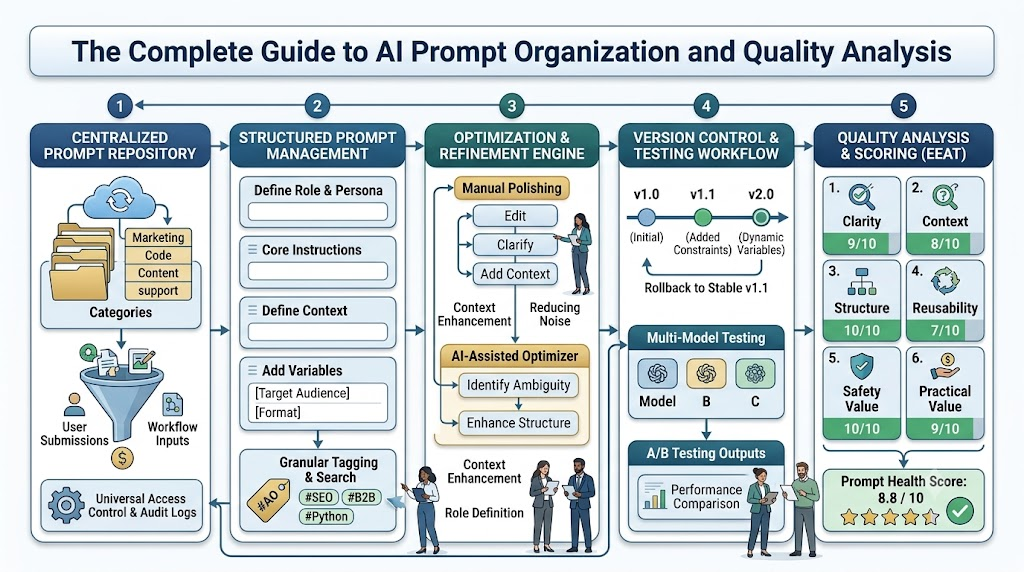
A high-performing, enterprise-grade prompt generally consists of five core architectural components:
- Role & Persona: Defines the perspective, expertise, and tone the AI should adopt (e.g., “Act as a Senior FinTech Copywriter”).
- Instruction: Clear, active commands detailing the exact task to perform.
- Context: Essential background information, reference data, or domain constraints necessary for accurate generation.
- Variables: Dynamic placeholders (e.g.,
[Target Audience],[Product Name]) that allow a single prompt template to be reused across different scenarios. - Output Formatting: Explicit guidelines detailing structural layout, word count limits, Markdown preferences, or JSON schemas.
Constraints
Establishing clear negative constraints (e.g., “Do not use jargon,” “Never exceed 200 words”) prevents model drift and eliminates off-target generations. Utilizing a dedicated prompt engineering platform helps users map out these parameters systematically, ensuring that every variable and constraint is tracked and executed predictably.
Building an Organized AI Prompt Library
Scattered prompts lead to lost productivity. Using an AI prompt organizer allows users to build a searchable, well-structured repository that scales alongside their projects.
AI Prompt Repository Structure
├── Categories (e.g., Marketing, Engineering, Support)
│   ├── Sub-Categories (e.g., Email Campaigns, API Docs)
│   │   ├── Dynamic Tags (e.g., #SEO, #B2B, #Python)
│   │   │   └── Prompt Templates with Placeholders [Variable]
Categories and Tags
Logical categorization ensures fast discovery. Organizing prompts by primary domain (e.g., Marketing, Software Engineering, Legal, Customer Support) combined with granular tagging (e.g., #B2B, #Python, #SEO, #ColdEmail) prevents duplicate prompt creation.
Dynamic Variables
A truly reusable prompt relies on dynamic variables rather than static text. By substituting specific data points with adaptable tags like [Insert Target Keyword] or [Insert Primary Audience], a single master prompt can serve dozens of distinct campaigns without manual editing.
Search and Collections
Advanced prompt platforms offer full-text search, variable-based filtering, and custom collections. Creators can bundle related prompts into specialized execution suites—such as a “Product Launch Collection” or a “Code Review Workflow”—streamlining complex, multi-step AI tasks.
AI Prompt Optimization
Prompt engineering is an iterative process. An AI prompt optimizer enhances raw instructions by clarifying intent, adding necessary context, and removing linguistic ambiguity.
[Raw/Vague Prompt] ➔ [Context & Role Addition] ➔ [Constraint Injection] ➔ [Optimized Execution Asset]
Improving Clarity and Reducing Ambiguity
Generative AI models function on statistical probability; vague prompts yield generic, unfocused results. Optimization involves replacing broad requests with explicit guidelines.
Before and After Optimization Example
- Unoptimized Prompt: “Write a blog post about email marketing.”
- Optimized Prompt: “Act as a B2B SaaS Growth Marketer. Write a 500-word educational blog section explaining three strategies to improve email open rates for cold B2B prospects. Use active voice, bullet points for readability, and avoid generic fluff. Include a professional tone.”
By defining role, scope, target audience, structural layout, and tone upfront, the optimized version yields an immediately usable asset, saving valuable editing time.
AI Prompt Analysis
Before deploying prompts in production workflows, running them through an AI prompt analyzer identifies hidden structural flaws, missing context, or unassigned variables.
Key Analysis Metrics
- Goal Identification: Verifies whether the core objective of the prompt is clearly stated without conflicting directives.
- Variable Detection: Scans the prompt to ensure all dynamic variables are correctly formatted and declared.
- Context Sufficiency: Evaluates whether the LLM has enough background information to construct an accurate answer without making assumptions.
- Safety & Alignment Considerations: Checks for potential policy violations, unintended bias, or security vulnerabilities like prompt injection risks, adhering to safety frameworks detailed in Anthropic documentation.
Automated analysis provides objective feedback, helping creators fix structural weaknesses before generating low-quality outputs.
Prompt Quality Checking
A dedicated prompt quality checker scores inputs against established usability criteria, establishing objective standards across teams.
Quality Scoring Matrix
To maintain high standards, prompts should be evaluated across six core dimensions:
- Clarity: Are commands direct, unambiguous, and grammatically precise?
- Context: Is sufficient background provided to guide model reasoning?
- Structure: Is the layout well-organized using visual dividers, bullet points, or markdown?
- Reusability: Does the prompt leverage dynamic variables effectively for multi-use application?
- Safety: Is the prompt free of toxic phrasing, bias, or injection vulnerabilities?
- Practical Value: Does the prompt produce actionable, high-utility business outputs?
A quantitative scoring system (e.g., 1 to 100) allows prompt engineers to gauge prompt health, identify weak areas, and maintain high standards across shared libraries.
Version Control for AI Prompts
Small changes in prompt wording can lead to vastly different AI outputs. Treating prompts like code by using a specialized prompt version control tool is essential for maintaining operational stability.
Prompt v1.0 (Initial Draft) ➔ Prompt v1.1 (Added Context) ➔ Prompt v2.0 (Optimized Variables & Constraints)
Why Version History Matters
When an updated prompt produces unexpected or lower-quality results, version control allows users to instantly inspect changes and roll back to a known stable version.
Managing Team Collaboration and Experiments
In collaborative environments, multiple team members may edit shared prompts. Version control tracks who made changes, records release notes, and maintains an immutable history of prompt iterations. This audit trail is critical when managing production prompts connected to automated APIs or customer-facing applications.
Testing AI Prompts
Never deploy a prompt to production without testing it across multiple scenarios and edge cases. Using a dedicated AI prompt testing tool ensures consistent performance across diverse conditions.
A/B Prompt Testing and Model Comparison
A/B testing involves running two prompt variations against identical inputs to compare output accuracy, tone, and formatting compliance. Furthermore, testing the same prompt across different underlying LLMs (e.g., OpenAI GPT-4o, Anthropic Claude 3.5 Sonnet, Google Gemini 1.5 Pro) reveals which model handles specific prompt architectures best, as documented in Google AI documentation.
Measuring Output Consistency
Testing evaluates how consistently a prompt returns expected formats—such as strict JSON keys or standardized bullet structures—across repeated generations, ensuring reliable integration with downstream software systems.
Reusable AI Prompt Templates
Creating reusable templates across primary business domains turns AI from a simple chat interface into a systematic productivity engine.
Essential Domain Template Applications
- Writing & Content Creation: Standardized templates for blog outlines, social media hooks, email newsletters, and press releases.
- Software Engineering: Reusable prompts for code refactoring, unit test generation, bug diagnosis, and technical documentation, following standards outlined on Microsoft Learn.
- Marketing & Sales: Systems for generating audience personas, ad copy variations, cold outreach sequences, and landing page headlines.
- Customer Support: Master templates for empathetic ticket responses, refund explanations, and troubleshooting steps.
- Research & Education: Structured frameworks for summarization, key takeaway extraction, literature review generation, and complex concept explanations.
Leveraging pre-tested reusable AI prompt templates eliminates setup time and guarantees consistent quality across every department.
Promptosia for Different User Types
Writers
Writers use Promptosia to organize outline generators, tone polishers, and editing frameworks, ensuring consistent voice while eliminating blank-page fatigue.
Developers
Developers leverage Promptosia to manage technical prompts for code generation, API documentation, refactoring, and code review across multiple programming languages.
Marketers
Marketing teams centralize brand guidelines, ad copywriting frameworks, and email templates, enabling rapid campaign production while maintaining brand consistency.
Students
Students build structured study prompts, practice quiz generators, and research summarization templates to organize learning materials efficiently.
Researchers
Researchers design rigorous, highly contextualized prompts for data synthesis, literature mapping, and trend analysis across vast academic datasets.
Educators
Teachers and professors create lesson-plan builders, automated rubric generators, and differentiated instruction prompts to save administrative time.
Businesses
Enterprise operations utilize Promptosia to maintain compliant, standardized prompt libraries that streamline communication, customer support, and administrative reporting.
Content Creators
Social media managers and video creators structure scripts, title generators, and engagement prompts into executable creation pipelines.
Agencies
Digital agencies manage distinct client prompt libraries with tailored brand tones, variables, and compliance guidelines within isolated workspaces.
AI Professionals
Prompt engineers use advanced optimization, version control, analysis, and testing tools to design enterprise-ready AI prompts for client deployment.
Best Practices for Prompt Management
To build an efficient prompt management workflow:
- Save Successful Prompts Immediately: Capture prompts that deliver exceptional results into a centralized library before they are lost in chat histories.
- Standardize Naming Conventions: Use clear, descriptive titles (e.g.,
[Marketing] - B2B LinkedIn Post Generator v2). - Embed Dynamic Variables: Replace static names, topics, and dates with bracketed variables to maximize reusability.
- Organize by Intent and Domain: Use primary categories and flexible tags to keep your repository clean and searchable.
- Conduct Regular Quality Audits: Periodically analyze, test, and score prompts to ensure they remain effective as AI models evolve.
- Maintain Strict Version Control: Log changes and track performance variations across prompt iterations.
- Document Ideal Models: Note which LLM model and temperature settings deliver the best results for each specific prompt.
Common Prompt Engineering Mistakes
- Vague and Ambiguous Instructions: Failing to define clear goals leads to generic, low-quality outputs.
- Omitting Context: Expecting the AI to infer background details without explicit instructions causes hallucinations and inaccurate answers.
- Overly Bloated Prompts: Packing too many unrelated tasks into a single prompt confuses the model’s reasoning path.
- Neglecting Negative Constraints: Forgetting to specify what the AI should not do leads to unwanted formatting or tone drift.
- Skipping Systematic Testing: Deploying prompts without testing across diverse test inputs leads to unexpected edge-case failures.
- Ignoring Version Control: Overwriting functional prompts without keeping back-ups prevents rolling back when updates fail.
Comparison Table
| Operational Feature | Manual Storage (Docs/Notes) | Promptosia Platform |
| Organization | Fragmented across folders, local files, and chat logs | Centralized, tag-driven, searchable library |
| Version Control | Manual copy-pasting; prone to overwrites and loss | Automated version history tracking and instant rollbacks |
| Searchability | Limited keyword search across scattered files | Instant full-text, category, tag, and variable search |
| Prompt Testing | Manual, slow copy-pasting into chat windows | Structured testing and cross-model performance analysis |
| Quality Analysis | Subjective guesswork; no feedback metrics | Automated quality scoring and structural prompt analysis |
| Team Collaboration | Difficult sharing; risk of using outdated prompt versions | Centralized team workspaces, permissions, and shared assets |
The Future of Prompt Engineering
Prompt engineering is rapidly maturing from informal experimentation into a structured discipline within modern software engineering and enterprise operations. Key trends shaping the future include:
- AI-Assisted Optimization: Real-time AI engines that automatically evaluate and polish user prompts prior to execution.
- Enterprise Standardization: Standardized prompt governance policies that ensure regulatory compliance and brand consistency.
- Prompt Marketplaces & Sharing: Ecosystems where specialized creators share, monetize, and trade verified prompt templates.
- Autonomous Workflow Integration: Prompts integrated directly into software pipelines via robust APIs, driving automated agentic workflows.
- Prompt Passports & Portability: Standardized metadata formats that allow prompts to run reliably across diverse LLMs without re-engineering.
How Promptosia Helps Users Build Better Prompts
Promptosia provides an end-to-end management platform designed to turn prompt engineering into a streamlined, high-value practice:
- Centralized Prompt Library: Store, search, tag, and organize all your personal or team prompts in a secure cloud repository.
- AI-Assisted Optimization: Automatically refine vague inputs into clear, highly effective prompt templates.
- In-Depth Prompt Analysis: Identify missing context, unassigned variables, and structural weaknesses before execution.
- Version Control System: Track iterations, compare past versions, and restore previous iterations with one click.
- Systematic Prompt Testing: Run side-by-side experiments across different prompts and models to identify the best performers.
- Prompt Passports: Standardize prompt metadata for seamless execution across diverse generative AI environments.
- Prompt Duels: Compare outputs side-by-side in community evaluations to crowdsource the best prompt architectures.
- Community Sharing: Discover, benchmark, and fork high-performing prompt templates created by a global network of prompt engineers.
Frequently Asked Questions (FAQ)
What is an AI prompt management tool?
An AI prompt management tool is a dedicated software platform that helps individuals and teams organize, store, optimize, analyze, test, and version text prompts used with generative AI models. It turns scattered, single-use prompts into organized, reusable digital assets, improving productivity, brand consistency, and output quality across AI workflows.
Why should I save and organize my AI prompts?
Saving and organizing prompts prevents duplicate work, protects valuable prompt engineering IP, and ensures consistent AI outputs. Instead of re-writing instructions every time you start a new chat, an organized prompt library lets you quickly access, customize, and execute proven templates for recurring tasks.
What is the difference between prompt engineering and prompt management?
Prompt engineering focuses on crafting, structuring, and refining individual prompt inputs to get the best possible result from an AI model. Prompt management is the broader operational process of organizing, versioning, categorizing, testing, and sharing those engineered prompts across teams and workflows.
How does prompt optimization improve AI outputs?
Prompt optimization refines raw instructions by defining clear roles, adding necessary context, inserting dynamic variables, and setting clear constraints. This reduces ambiguity, prevents model hallucinations, and guides the AI to produce accurate, appropriately formatted results on the first attempt.
What is prompt version control and why is it important?
Prompt version control tracks changes made to a prompt over time. Because slight adjustments in wording can alter AI outputs, version control allows users to compare different iterations, track improvements, document updates, and instantly restore previous versions if an edit degrades output quality.
Why is systematic prompt testing necessary?
Testing prompts across different inputs, parameters, and AI models ensures they perform reliably in real-world conditions. Systematic testing reveals edge-case weaknesses, identifies format drift, and verifies which model yields the most accurate, cost-effective, and consistent results for a specific task.
How does an AI prompt analyzer work?
An AI prompt analyzer evaluates a prompt’s structure, clarity, context, variables, and constraints. It identifies potential issues—such as vague commands, missing parameters, or safety concerns—and offers actionable suggestions to strengthen the prompt before running it in production workflows.
What features make a high-quality AI prompt?
A high-quality prompt features a clearly defined role, explicit instructions, sufficient context, dynamic variables for reusability, negative constraints, and structured output formatting guidelines. It avoids broad generalizations, providing the AI with a clear framework to generate accurate responses.
Can teams collaborate on prompt libraries using Promptosia?
Yes, Promptosia allows teams to build shared prompt repositories, assign role-based permissions, collaborate on prompt variations, maintain version histories, and standardize AI inputs across departments, ensuring enterprise-wide operational consistency and compliance.
Who benefits most from using Promptosia?
Promptosia is designed for writers, developers, marketers, researchers, educators, students, businesses, agencies, and prompt engineers. Anyone who uses generative AI regularly can leverage Promptosia to organize workflows, refine instructions, and maximize the value of their AI interactions.
Conclusion
Generative AI offers unprecedented opportunities for innovation, speed, and operational efficiency, but realizing its full potential requires moving past ad-hoc prompting habits. Scattered text files and unorganized chat histories create operational bottlenecks, lead to inconsistent outputs, and waste valuable team time. Adopting a structured AI prompt management tool allows individuals and enterprise teams to transform raw prompts into structured, reusable digital assets. By establishing an organized AI prompt library, optimizing instructions, leveraging version control, analyzing prompt health, and testing performance across models, organizations build scalable AI workflows that deliver consistent, high-quality results.