Introduction
A busy dinner service can feel like a storm. Phones ring nonstop. Guests walk in without bookings. Hosts juggle paper logs and lost notes. One empty seat means lost money, but one double booking means an angry guest. Every restaurant wants happy diners and full tables at the same time. That balance is hard to hold with old methods. This guide breaks down how modern tools fix these daily problems. We explain each feature in plain English, with no confusing jargon. You will learn how software connects online bookings to real tables on the floor. We also show how DineGlobe, a modern hospitality platform, links online reservations with front-of-house table control. No pushy sales talk here. Just clear, practical help for restaurant teams.
Why Modern Dining Rooms Need Digital Reservation Systems
The main goal of reservation software is simple. It takes bookings online, day and night, so your staff can focus on guests. A guest can book a table at midnight from their phone. The system saves that booking without anyone lifting a finger. Staff then spend their energy on hospitality, not paperwork.
Paper logbooks cause real trouble. Handwriting gets messy. Slips go missing. Two hosts write the same table for two different guests. Digital systems remove these errors because one booking locks one table slot. The system also organizes table turns. A turn is the time a table stays with one party before it resets for the next. Good software tracks turns so seats never sit empty too long. This is why modern Restaurant Reservation Software has become a basic need, not a luxury.
Direct Bookings vs Third-Party Dining Marketplaces
Where guests book matters a lot. Direct bookings keep guest data in your hands. Third-party marketplaces charge fees for every cover, meaning every seated guest. Those fees add up fast. Owning your booking channel protects both your budget and your guest relationships.
| Booking Channel | Guest Data Ownership | Per-Cover Commission Fees | Brand Experience | Operational Control |
|---|---|---|---|---|
| Direct Restaurant Booking Page | Full ownership by the restaurant | None | Fully branded to your venue | Complete control of bookings and notes |
| Third-Party Marketplace App | Shared or held by the platform | Often charged per seated guest | Mixed with other venues | Limited control over guest details |
| Traditional Phone Bookings | Basic notes kept by staff | None, but staff time is costly | Personal but slow | Depends on staff memory and logs |
| Walk-In Only Operations | No guest data captured | None | First-come, first-served feel | No forward planning possible |
Direct booking links build loyalty over time. Guests return to your own page and book again. You keep their notes, likes, and contact details. So each booking becomes a chance to build a lasting relationship, not just fill one seat. You can see how this works on the [DineGlobe direct booking page](LINK: DineGlobe Direct Booking Feature Page).
Direct Restaurant Booking System and Customer Relationships
A Direct Restaurant Booking System lets guests book straight from your website. No middleman sits between you and the diner. The guest picks a time, enters details, and gets instant confirmation. Your team sees the booking right away on the host screen.
Clear confirmation codes matter. A guest should always have proof of their booking. Self-service cancellation links help too. Guests can change plans without calling during a rush. This cuts phone noise and frees your hosts.
You also keep full control of diner notes. Notes include allergies, birthdays, or seating wishes. These small details turn a normal meal into a memorable visit. An Online Restaurant Booking System also works after hours. Guests book while your doors are closed, and your morning team finds a full book ready to go.
Restaurant Table Management Software and Live Seating
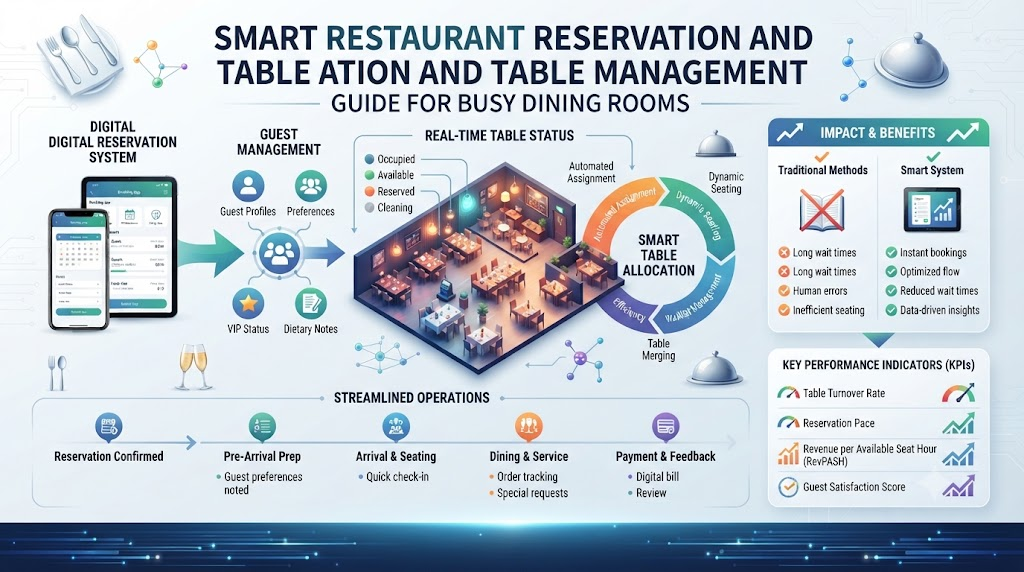
Restaurant Table Management Software connects bookings to real tables in real time. When a guest books, the system assigns a physical table. Hosts see which tables are open, seated, or being cleaned. This live view stops the classic mistake of seating two parties at one table.
Seating buffers are a key idea. A buffer is a small gap between bookings on the same table. It covers slow eaters and late arrivals. The software helps you set buffers by party size and day of week. Meal durations get tracked too, so you learn how long an average dinner really takes.
Clean tables need tracking as well. A table is not free until staff clear and reset it. The system shows “dirty” versus “ready” states. Hosts then seat the next party with confidence, not guesswork.
Restaurant Floor Plan Software and Layout Optimization
Restaurant Floor Plan Software gives you a visual map of your dining room. Think of a bird’s-eye view of every table, booth, and patio spot. You build this map once, then drag and drop tables as needed. Hosts read the room at a glance instead of hunting through a list.
Large parties need table joins. Two small tables become one big table with a single click. The system then blocks both tables for that party, so no one else grabs half of them. Reservation holds work in a similar way. A hold keeps a table open for a short window, like a VIP guest who is five minutes away.
Server sections stay fair with good mapping. The software splits tables into balanced zones per server. So one waiter does not get ten tables while another gets three. Fair sections mean calmer staff and faster service. You can explore this on the [DineGlobe floor plan page](LINK: DineGlobe Floor Plan Feature Page).
Restaurant Waitlist Management Software for Peak Hours
Friday and Saturday nights fill up fast. A full dining room is good news, but front doors still get crowded. Restaurant Waitlist Management Software handles that crowd with calm and order. Hosts add each waiting party to a digital queue. No more scribbled names on scrap paper.
Accurate wait times keep guests happy. The system checks live table turns and open gaps to estimate a real return time. A guess of “twenty minutes” becomes an actual data-backed number. Guests then get a text when their table is close. They can walk nearby instead of standing in a cramped doorway.
Tracking party sizes also matters. A party of two and a party of six need very different tables. The waitlist sorts parties by size and matches them to the right open seats. Nothing gets wasted, and no guest feels forgotten.
Restaurant Host Stand Software for Smooth Shift Handovers
The host stand is the front door of your whole operation. Restaurant Host Stand Software gives that desk one central screen for all service details. Bookings, walk-ins, table states, and guest notes all live in one place.
Shift handovers become easy. The morning host writes notes in the system. The evening host reads them and knows every special case. No details get lost in a verbal chat near the kitchen door.
Managers also stay informed from anywhere. They can check covers, late tables, and wait times without walking to the front. Welcoming guests stays personal, because the software handles the memory work. Hosts greet, seat, and track arrivals while the system quietly keeps every record straight.
Restaurant Walk-In Management Software for Spontaneous Diners
Not every guest plans ahead. Many great guests simply walk through the door. Restaurant Walk-In Management Software helps hosts balance advance bookings with these sudden arrivals. The screen shows open gap times between reservations. A host can fit a quick party of two into a gap before the next booked table arrives.
Quick registration takes seconds. The host enters the party size and name, and the guest joins the flow. For full nights, the walk-in joins the waitlist with a fair place in line.
Updating table availability happens on the fly. When a guest pays and leaves, the table flips to “cleaning” and then “open.” Walk-ins then get seated fast. So no seat sits idle and no spontaneous guest gets turned away too soon.
Essential Front-of-House Shift Readiness Checklist
A strong service starts before the first guest arrives. Smart hosts review the room before the rush. They check bookings, layouts, and staff sections one time. This short ritual saves hours of confusion later.
| Check Point | What to Review | Operational Impact |
|---|---|---|
| Table Availability & Holds | Open slots and held tables for VIP guests | Prevents clashes with advance bookings |
| Combined Table Layouts | Joined tables for large parties tonight | Big groups get seated without delay |
| Expected Shift Covers | Total booked guests across the evening | Helps plan staff and kitchen prep |
| Walk-In Seating Buffer | Open gaps kept for sudden arrivals | Keeps walk-in guests happy all night |
| Server Station Balance | Fair table counts per server section | Staff stay calm and service stays fast |
| Special Guest Notes | Allergies, birthdays, and seating wishes | Small touches create loyal regulars |
Reviewing bookings before the dinner rush changes the whole night. Hosts spot problems early, like three big parties at the same time. They fix the plan while the room is still quiet. So the rush feels calm, and guests feel the difference.
Restaurant Reservation Software for Small Restaurants
Small venues have the same problems as big ones, just with fewer hands. A family diner, a neighborhood cafe, or a boutique bistro often runs the front desk with one person. That person also pours drinks and clears tables. Restaurant Reservation Software for Small Restaurants fits this world well.
These tools need no dedicated reception staff. A tablet at the counter handles every booking and walk-in. No costly hardware or server room is needed. The owner sets the rules once, and the system follows them every shift.
Compact teams gain real freedom from this setup. The owner can check tonight’s covers from home. The single host stops juggling a phone, a notebook, and a queue. So small venues deliver big-restaurant order with a warm, personal touch.
Free Restaurant Reservation System and Pilot Programs
A Free Restaurant Reservation System lets owners test modern tools before spending money. Pilot programs usually include the core features for free. Online reservations, table layouts, and waitlist tools come included. Role-based staff logins are part of the package too. Terms stay transparent, with no hidden fees.
This model works well for cautious owners. Try the system for one month. Run real dinner services on it. Watch how guests book online and how hosts manage the floor. Then decide if a paid plan fits your future budget. You can start with the [DineGlobe free pilot program](LINK: DineGlobe Free Pilot Signup Page).
A pilot also teaches your team new habits with zero risk. Staff learn the screens during calm weeks. By the time the busy season hits, everyone moves fast. So you upgrade with proof, not guesswork.
Multilingual Support and Modern Operations with DineGlobe
[DineGlobe](LINK: DineGlobe Homepage) brings reservations, table layouts, waitlists, and arrival tracking into one platform. Hosts see the full picture on one screen. Owners see the whole operation from one dashboard. Nothing gets scattered across five separate tools.
Multilingual support is a standout strength. DineGlobe works in English, Japanese, and Arabic. International hotel teams can switch host stand screens between languages during shifts. Global travelers read confirmations in their own language. So every guest feels welcome, and every staff member works in the language they know best. See the full feature list on the [DineGlobe features page](LINK: DineGlobe Features Page).
Real-Life Dining Room Scenarios
- A busy downtown bistro seats walk-in couples at high-top tables. At the same time, it holds dining booths for reserved anniversary dinners. The host sees both needs on one live screen and keeps every seat earning.
- A neighborhood family restaurant joins two square tables into an eight-person banquet setting. Visual floor-plan controls show the combined table clearly, so servers set it up right the first time.
- An independent sushi bar uses direct booking links to skip third-party per-cover commissions. Guest dietary notes travel with each booking, so the chef knows preferences before guests sit down.
- A multi-language dining room team in an international hotel switches host stand screens between English, Japanese, and Arabic during shifts. Every host works in a familiar language, and guest notes never get lost in translation.
Common Mistakes to Avoid in Restaurant Table and Booking Management
- Taking reservations on paper slips that get misplaced during busy lunch services. The fix is simple: move the book to one digital screen that every host can read.
- Overbooking peak dining hours without leaving seating buffers for delayed diners. Add small gaps between bookings so late guests never cause a chain of angry waits.
- Relying entirely on third-party food portals and losing direct contact with loyal guests. Start a direct booking page so guest data and relationships stay with you.
- Forgetting to update table statuses when seated guests finish paying their bill. Train hosts to flip tables to “cleaning” at once, so open seats never sit hidden.
- Turning away walk-in diners because the host team cannot see upcoming booking gaps. Use a live view that shows free slots between reservations before saying no.
- Guessing table wait times without checking real-time dining room turn averages. Let software estimate waits from actual data, so quotes stay honest and guests stay patient.
- Failing to set up role-based logins, allowing accidental edits to shift policies. Give each role the right access level so hosts cannot change pricing or booking rules.
- Locking small venues into rigid, high-fee reservation contracts before testing free pilots. Run a free trial first, then commit only after the results prove real value.
Simple Reservation Setup and Service Checklist
- Set up and customize direct online booking pages with clear opening hours. Double-check holiday hours so guests never book a closed door.
- Build visual dining room floor plans with exact table numbers and chair counts. Walk the room with a tablet to match the map to real life.
- Establish default dining turn times based on party size. Small tables turn faster than large ones, so set each size separately.
- Train host teams on registering walk-ins and updating live table occupancy. Practice during quiet shifts, so busy nights feel easy.
- Configure automatic confirmation messages and self-service adjustment links. Guests then change plans alone, and your phone lines stay calm.
Frequently Asked Questions
1. What is the difference between direct booking systems and third-party restaurant portals?
A direct booking system lives on your own website. Guests book with you, and you keep all guest data. Third-party portals sit between you and the diner. They often charge a fee for every seated guest. Direct systems build loyalty and save money. Third-party portals bring new eyes but cost more. Most restaurants benefit from using both, with direct bookings as the main focus.
2. How does online table management software stop double bookings during busy shifts?
The system links each booking to one physical table. When a slot fills, it locks at once. A second host cannot assign the same table to another party. Live screens show every table state in real time. So two bookings never land on one table. Staff see the full picture, and errors simply cannot hide.
3. Can small independent cafes benefit from digital reservation platforms?
Yes, small cafes gain a lot. A single tablet handles bookings, walk-ins, and the waitlist. The owner sets rules once, and the system follows them every shift. No reception staff is needed. Cafes fill seats faster and keep guest notes in one place. Small teams then deliver calm, organized service without extra cost.
4. How does restaurant floor plan software handle large party table combinations?
Hosts drag two or more tables together on a visual map. The software joins them into one unit with a single click. Both tables then block for that party only. No other guest can book half the group’s space. After the meal, the tables split back to normal. So big groups get seated fast, and small tables return for regular service.
5. What is the best way to handle walk-in diners during fully booked evenings?
Add walk-ins to a digital waitlist with a fair place in line. Check live gap times between reservations. Fit small parties into short gaps where possible. Send text alerts when tables near ready. Guests then wait comfortably nearby. Honest wait times and clear updates keep walk-in guests happy, even on the busiest nights.
6. How does digital waitlist software estimate accurate return times for waiting guests?
The software watches live table turns and open slots. It tracks how long meals actually take at your venue. Then it matches each waiting party to likely open times. So a quote of twenty minutes reflects real data, not a guess. Guests get a text when their table nears ready. Waits feel short because guests trust the number.
7. Can guests modify or cancel their reservations without calling the restaurant?
Yes, self-service links make this easy. Each confirmation includes a link to change or cancel the booking. Guests pick a new time or release the table alone. The system updates the host screen right away. Your phone lines stay quiet during rushes. Guests love the control, and hosts love the calm.
8. What hardware or devices do host teams need to run modern host stand software?
Most host stand software runs on a simple tablet or laptop. A stable internet connection is the main need. Some venues add a small printer for guest slips. No server room or costly machines are required. Small restaurants often start with one tablet at the front desk. So setup stays cheap, fast, and easy for any team.
9. How do role-based staff permissions protect restaurant booking data?
Role-based logins give each staff member the access they need, nothing more. Hosts manage bookings and seating. Managers handle pricing and shift rules. Owners see full reports. So accidental edits stay rare. Sensitive guest details stay protected. If someone leaves the team, you remove their login in seconds. Data stays safe and tidy.
10. Why is multilingual platform support useful for modern hospitality teams?
Modern dining rooms host diverse teams and global travelers. Staff work best in the language they know well. Guests feel welcome when confirmations match their language. Platforms like DineGlobe support English, Japanese, and Arabic. So a hotel team can switch screens between shifts. Notes and bookings stay clear for everyone, and service flows without confusion.
11. What features are included in a free restaurant reservation system pilot?
Free pilots usually include the core tools. Online reservations come first, with a direct booking page. Table layouts and waitlist tools are included too. Role-based staff logins keep access clean. Confirmation messages and guest notes round out the package. Terms stay transparent, with no hidden charges. Owners test real dinner services, then decide on a paid plan with proof in hand.
12. How does DineGlobe combine table management, waitlists, and bookings in one tool?
DineGlobe unites reservations, table layouts, waitlists, and arrival tracking on one platform. Hosts see bookings and physical tables on a single screen. Walk-ins join the same live flow. Floor plans update in real time as parties sit and leave. Multilingual screens support diverse teams. So owners run the whole front of house from one calm, connected system.
Conclusion
Great service balances many moving parts at once. Guests want warmth and speed. Tables need steady turns. Direct bookings protect your guest data and your budget. Live table control keeps the floor calm. Walk-in tools keep spontaneous diners happy. When these pieces work together, the rush stops feeling like a storm. Hosts greet instead of scramble. Managers see problems before they grow. Restaurateurs who set up smooth, organized table systems create memorable dining experiences. So start simple, test the tools, train your team, and watch your dining room run with ease. Ready to see it in action? [Book a DineGlobe demo](LINK: DineGlobe Demo Booking Page) and explore the platform yourself.